
I suck at filing away receipts.
Every month my accountant needs my company's invoices in a shared folder. And every month I'd go through my inboxes, download each PDF, rename it, upload it again, and then chase the ones I couldn't find.
Reddit lovingly calls this being a meat proxy: the human who carries data between two systems because they don't talk to each other.
At the end of August I handed the job to Claude Code. It runs as a scheduled task in Anthropic's cloud every Monday, with a small script doing the repetitive part.
The first version took about an hour. Getting it right took a few more sittings, and I'll show you what broke along the way.
If you only want to build your own, skip to how to set it up, or straight to the brief at the end.
What it does
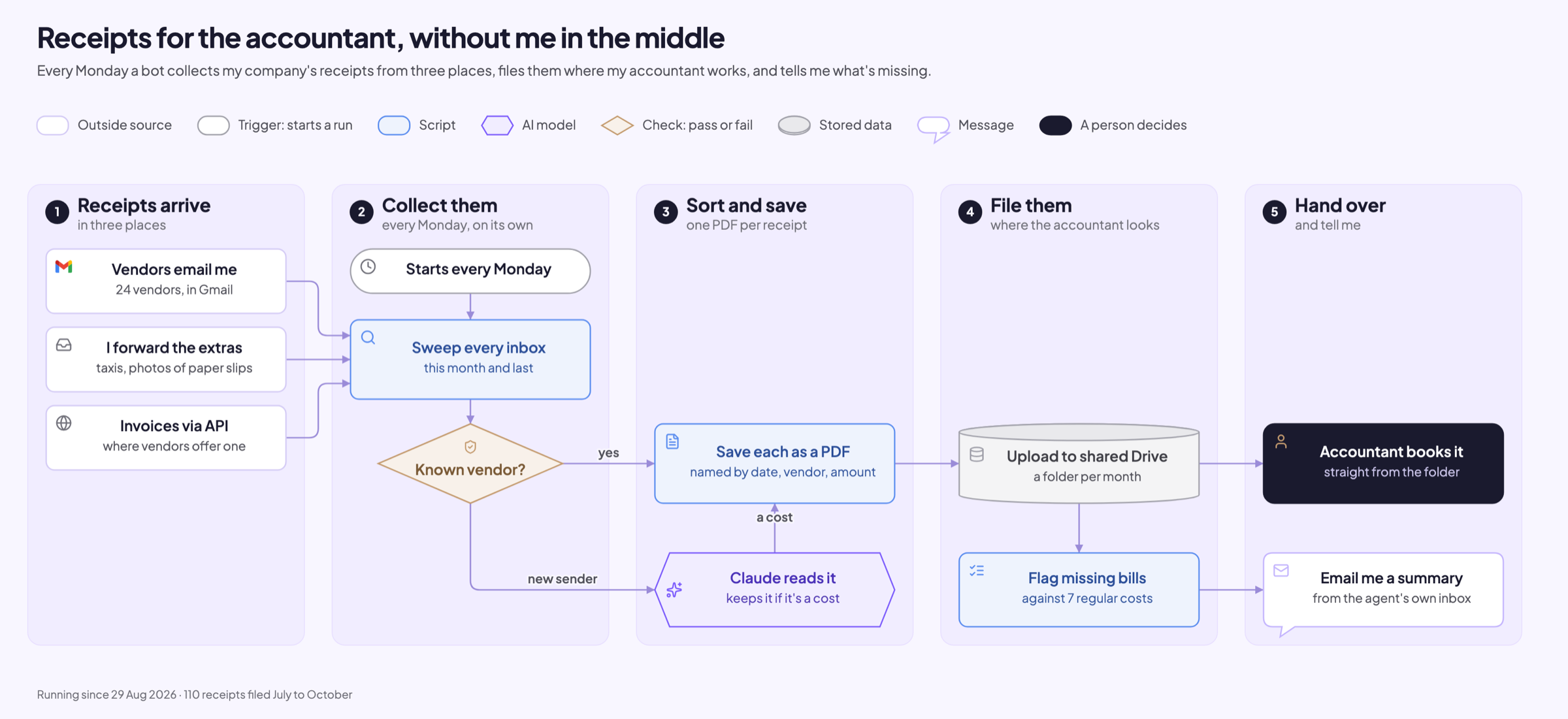
Every Monday morning, without me doing anything, Claude Code:
- Checks my Gmail, the inbox my AI agent has for itself, and the billing APIs of vendors that offer one
- Saves each receipt as a PDF named by date, vendor and amount
- Reads every PDF from a sender it doesn't know and keeps it only if it's a business cost
- Uploads each month to the shared folder my accountant works from
- Flags any of my 7 regular monthly costs whose bill never showed up
- Emails me a short summary and pings my phone
For a taxi or a paper slip, I forward the email or snap a photo and send it to the agent's inbox. It gets filed with the rest.
So far it has filed 110 receipts: 8 in July, 14 in August, 41 in September and 47 in October. July and August came in on the very first run, everything after that week by week.
How it evolved
The first hour
On 29 August I sat down with Claude Code and built the first version in about an hour. It did three things:
- Pulled receipts from my Gmail and the agent's inbox into one folder per month, and uploaded each month to Drive
- Kept going when one inbox was unreachable and told me which one, so one hiccup doesn't kill the whole run
- Checked each month against the regular costs in my budget, so a bill that never came shows up
The same day I set it up as a scheduled task for Monday mornings.
Three quiet weeks
Then I left it alone. It ran every Monday from the end of August, and I let a full month of real receipts come in before touching the code again.
Fixing September
On 23 and 24 September I went through that first month properly. A few things were off.
The best one: it had filed a payment reminder from one vendor as if it were the invoice.
Turns out that vendor never emails invoices at all, only reminders. So now the run pulls their invoices straight from the vendor's billing API.
Then the boring fixes:
- Vendor names were inconsistent, some of my forwards got filtered out and a few receipts landed twice
- The missing-bill check warned me about bills that simply hadn't arrived yet, so now it waits until the month is over
And after a month of using it, I added what I actually wanted:
- A summary email every Monday
- Claude reading PDFs from senders outside my vendor list, so a receipt from a new vendor still gets filed
- Photos and costs I type into the agent's inbox myself, like a taxi ride
- All keys moved into 1Password, so the cloud run needs just one token
October edge cases
Surprise surprise, my duplicate rule from September was too eager. Two charges from the same vendor, on the same day, for the same amount were two real charges. They're kept as separate files now.
I also had it read forwards in full, including attachments that only come as a download link.
Since then the code hasn't changed. Once in a while I drop a receipt in by hand.
How it works
It's two parts working together.
A Python script does everything that should happen the same way every time: searching the inboxes, saving PDFs, naming them, uploading to Drive and checking for missing bills. Claude Code does everything that needs reading or judgment. Every Monday it starts a fresh session in the cloud, clones the repo, and follows a runbook:
- Runs the script for this month and last month
- Opens every PDF from an unknown sender and decides whether it's a business cost
- Reads vendor, amount and currency off the taxi photos I send in
- Commits the new receipts back to the repo
- Sends the summary email and a push notification
- Tells me plainly if something failed
The runbook lives in a CLAUDE.md file in the repo: what to run, how to judge a PDF, and the hard rules. Claude Code reads that file at the start of every session, so changing how the run works means editing a text file.
Why split it? The script can't decide whether a PDF from a coworking space I've never booked before is a business cost. And I don't want Claude improvising how files get named.
The toolstack
- Claude Code scheduled tasks (formerly called routines) run the weekly session in Anthropic's cloud, so my laptop can stay closed
- A private GitHub repo holds the script, the runbook, my vendor list and every collected receipt
- The Gmail API, read-only, through a Google Workspace service account. It can't send, delete or even label an email
- The Google Drive API, limited to files the key itself created, so it can't see the rest of my Drive
- AgentMail gives the agent its own email address for the stuff I forward, and sends the Monday summary
- Vendor billing APIs, where a vendor offers one
- 1Password holds every key through a service account
What you need
Basically two lists, a folder and a way into your mail:
- The vendors who bill you, with the address their receipts come from
- Your regular monthly costs, so it can tell you which bill didn't arrive
- A folder your accountant can open
- Read access to your mailbox (more on that below)
- A Claude plan with Claude Code, and a GitHub account
- Optional: a second inbox for the agent, for forwards and photos
Your budget or last month's bank statement is the quickest place to find the two lists.
How to set it up
1. Folder and lists
Make one shared folder with one subfolder per month, and agree with your accountant that this is where they look.
Put your vendor list and your regular costs in two small files. Mine are JSON files in the repo, so adding a vendor is one line.
2. Access to your mail
I use a Google Cloud service account with domain-wide delegation. It gets two scopes:
gmail.readonly, so it can read mail and nothing elsedrive.file, so it only sees files it uploaded itself
Granting domain-wide delegation takes a Workspace super admin. Not you? See the options below.
3. Build it locally first
Open Claude Code on your own machine, paste the brief from the end of this post with your two lists, and let it build the script.
Then:
- Have it write the runbook into
CLAUDE.md: how to run it, how to judge an unknown PDF, and what it must never do - Do a dry run on last month and compare it with what you'd have filed by hand
- Add vendors or rules for whatever it missed, then run it for real
- Push it all to a private GitHub repo
My judging rule: invoices, receipts and payment confirmations count. Contracts, quotes and statements don't. When in doubt, it leaves the file out. A wrong file in my accountant's folder costs more than a late one, and the Monday email lists every call it made, so I catch its mistakes.
4. Keys
Your run needs a few keys: the mail key, the agent inbox key and any vendor API keys. Keep them out of the repo.
I keep all of them in 1Password and give the cloud run a single service account token that can only read that one vault.
Anthropic's docs suggest network secrets for API keys: the key gets attached to requests outside the session, so Claude never sees it. They fit keys that travel in a request header. A Google service account key file isn't one of those, so for that one you need a password manager or an environment variable.
5. The cloud environment
Every cloud run happens inside an environment, which decides what the session can reach. You set it up at claude.ai/code from the environment selector under the message box. There are three parts:
- Network access. Pick Limited and keep Allow package managers checked. Google's APIs are already on the default list. Add the hosts it needs beyond that under Allowed domains: for me the agent inbox API, the password manager and one vendor's billing API.
- Environment variables. One line per variable,
KEY=value. Mine holds just the 1Password token. Anyone who uses the environment can read these values. - Setup script. A Bash script that runs before Claude starts. Mine installs the 1Password command-line tool. It runs as root on Ubuntu and gets cached, so keep it under about five minutes and make sure it exits cleanly.
Python, uv, git and the usual tools are already installed, so the script itself needs nothing extra. I keep a copy of the setup script in the repo, so I know what's in that box.
6. The scheduled task
Go to claude.ai/code/routines and click New task, or type /schedule in Claude Code. Then:
- Prompt: the steps for each run. Mine is below.
- Repository: your private repo. Connect GitHub first if you haven't.
- Environment: the one from step 5.
- Schedule: weekly. Mine runs Mondays at 00:00 UTC, which is 08:00 where I live.
- Model: I use Sonnet for this.
- Connectors: every connector on your account is included by default, and Claude can write with them. Remove the ones the run doesn't need.
By default Claude pushes to a branch starting with claude/. My prompt tells it to commit the receipts and push, so they land in the repo directly.
7. First run
Click Run now on the task's page. Read the session transcript, check the folder, then check your inbox. Every later run shows up on the same page, so when something looks off on a Monday, the transcript tells you why.
My scheduled task prompt
This is what Claude Code gets every Monday, lightly trimmed:
Run the weekly receipts collection per CLAUDE.md in this repo.

1. Load the keys from the password manager. If its CLI is missing, run the setup script
   in .claude/. Check access without printing any secret. If that fails, stop and report
   what is missing. Never improvise credentials.
2. Work out the current month and the previous month from today's date.
3. Run the collector for both months with --drive and save each month's JSON output.
4. For every PDF listed under to_judge, open it and decide cost or not-cost per the rules
   in CLAUDE.md. Record each verdict with a short reason. For a cost, also record vendor,
   amount, currency and category. Then re-run that month. Decide yourself; never leave a
   verdict for me.
5. Commit receipts/ and push, with per-month counts and verdicts in the message. Skip the
   commit if nothing changed.
6. Send the summary email with notify.py. The wording lives in that script; don't write
   your own.
7. Send me a short push notification: the email's subject, or what failed.
8. Final message: receipt counts per month, totals per currency, the Drive result, every
   verdict with its reason, failed sources, and whether the email went out. If a step
   failed, say so plainly. Never fake a success.

Hard rules: mailboxes are read-only; never print credential values; never delete
collected receipts or Drive files.
If you're not a Workspace admin
Just so you know: domain-wide delegation needs a Google Workspace super admin. On a free Gmail account, or if someone else runs your company's Workspace, you need another way in.
Full disclosure, I haven't run any of these myself. Prices checked on 17 November 2026.
| Option | How it works | Cost | Catch |
|---|---|---|---|
| Your own OAuth app | A Google Cloud project with a desktop OAuth client, and you as its test user | Free | In testing mode Google expires your consent after 7 days, so you re-approve every week |
| Google Apps Script | A script in your own account on a weekly timer, saving Gmail attachments to Drive | Free | No AI judgment unless you add a model call yourself |
| Zapier | Gmail "New Attachment" trigger plus Google Drive "Upload File" | Free for 100 tasks a month; Professional from $19.99 a month, billed yearly | The free plan allows two steps only, so an AI check means paying |
| n8n | Gmail trigger, Google Drive upload and an LLM node for unknown PDFs | Free if you host it yourself; Cloud Starter from €20 a month, billed yearly | Hosting it yourself means running a server |
| Make | Same shape as Zapier | Free for 1,000 credits a month | Check their pricing page for paid plans |
You can combine the OAuth route with everything above: the script uses your own consent instead of a service account, and you re-approve every week while the app is in testing.
If someone else runs your company's Workspace, ask them before you hook any of this up to your work mail.
One shortcut worth asking about: does your accountant's software take bills by email? Xero, for one, gives you an address to email bills to. Then the run only has to forward.
What it costs
In time, for me:
- About an hour on 29 August for the first version
- Two sittings in late September and a short one in early October, fixing what the first weeks turned up
- Now: reading the Monday email and forwarding the odd taxi receipt
In money, the minimum to run my setup (prices checked on 17 November 2026):
- Claude Pro: $20 a month, or $17 a month billed yearly. The cheapest plan with Claude Code and scheduled tasks. Each run uses your normal plan usage, and the cloud machine itself costs nothing extra
- Google Workspace: from $7 per user a month, only for the service-account route
- Gmail and Drive APIs: free at this volume
- AgentMail: free for 3 inboxes and 3,000 emails a month
- 1Password: optional. Service accounts come with the team plans, Teams from $24.95 a month for up to 10 people. Network secrets cover header-based API keys at no extra cost
- GitHub: free, private repos included
If you already pay for Claude and Workspace, this adds nothing on top.
Brief for your agent
Paste this into Claude Code, or any coding agent, and fill in the last three lines. It builds the script and the runbook; steps 5 to 7 above turn it into a weekly run.
Build me a receipts collector for my business, plus a CLAUDE.md runbook for running it.

Every run it should:
1. Search my mailbox, read-only, for receipts and invoices from this month and last month.
2. Save each one as a PDF named YYYY-MM-DD_Vendor_amount-CURRENCY.pdf. If a receipt
   is only a link or the email body, render it to a PDF stamped with sender, subject and date.
3. Treat mail from my vendor list as receipts. Put PDFs from anyone else in a to-judge list
   for you to read and decide: a cost to my business (invoice, receipt, payment
   confirmation) or not (contract, quote, statement, an invoice I sent). When unsure,
   leave it out and give a one-line reason.
4. Keep one receipt per email thread, preferring the PDF attachment. File receipts a payment
   processor sends under the merchant. Leave out invoices I send to clients. Two charges from
   the same vendor on the same day for the same amount can both be real; keep both.
5. Upload each month to my shared folder, one subfolder per month, skipping files already
   there. Never delete anything.
6. Check my regular monthly costs against what it found and list the ones with no bill once
   the month is over.
7. Write a manifest per month, and a list of every email it skipped with the reason.
8. Email me a summary: receipt count, totals per currency, the calls it wasn't sure about,
   and missing regular bills.
9. If one source is unreachable, report it and finish the rest.

Mailbox access stays read-only. Read every key from a password manager or environment
variables, never from the code. Start with a dry run on last month and show me what it
would file before you upload anything.

Vendors (name and sender address):
Regular monthly costs:
Shared folder:
110 receipts filed since July, and I haven't chased one since. My accountant now closes the month a day after it ends, and I get to bask in the praise for a job Claude does.
Worth looking at where you're the meat proxy in your own week.